
Returns in Gorgias: when the chatbot hands over to an agent

“Where can I download my return label?” In Gorgias live chat, Klark answers questions about the returns process and can hand over the conversation and its history to an agent when a case needs a check Klark can’t perform.
A few messages later, the same shopper says they’ve already sent their parcel back and asks about their refund. An agent picks up the Gorgias ticket, and the shopper receives the reply in the same chat.
This demo follows a shopper returning a bag. It shows what the agent sees in Gorgias and what the shopper sees after the agent replies.
See the handover in Gorgias
In this test, the shopper refers to a fictional order confirmation that says the return label is available under My Orders. Klark explains where to go: open the order, select the item, and download the label.
The shopper then explains that they have already returned the bag and are still waiting for their refund. They ask to speak to an agent. Klark announces the handover, and the ticket is routed to the designated team. The question about the label, Klark’s answer, and the refund query all remain in the same Gorgias conversation.
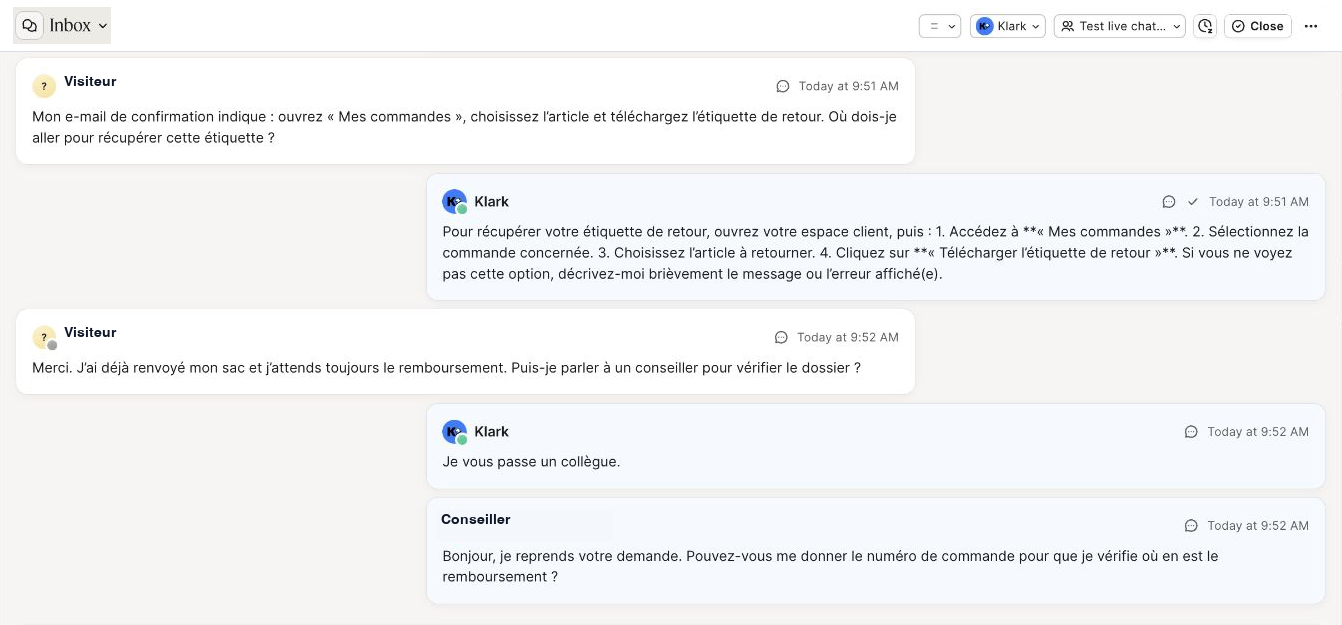
The agent opens the ticket and asks for the order number. The shopper receives that reply in the chat and confirms they can see it. Their confirmation also appears in the Gorgias ticket. The agent can then use the order number to investigate the refund.
Watch the Gorgias live chat demo
The video follows the shopper from opening the chat on the store to the handover to a support agent in Gorgias. The demo is in French.
When should a return query go to your support team?
To decide who should answer, look at what the shopper needs. They may want instructions, an update on a specific return, or a decision from your team.
| What the shopper asks | What you need to answer |
|---|---|
| “Where can I download my return label?” | Current instructions showing where to find the label on your store. |
| “Have you received my return parcel?” | A reliable status for the correct return, for example from your returns portal or carrier tracking. |
| “My refund is incomplete. Can you check?” | An agent who can compare the order, the items received, and the refund recorded. |
For instructions, check that the chatbot gives the shopper steps they can follow. If your process varies by country, item, or delivery method, include those differences in your help content.
For status questions, the answer depends on the records you can access. A carrier marking a parcel as delivered and a warehouse recording the return are separate events. If you can’t check which stage it has reached, make sure an agent can pick up the case with what the shopper has already explained.
An incomplete refund takes more investigation. In the demo, the agent starts by asking for the order number. The conversation already tells them that the shopper has sent back the bag and wants the refund checked.
For the rest of the workflow, from choosing a returns portal to approving a refund, see our guide to automating returns and refunds.
How to test the handover on your store
Start with the widget your shoppers see and carry the test through to the agent’s first reply. Ask two people to run through it, one in the widget and one in Gorgias. Use your store’s real returns procedure and a fictional or dedicated test case.
- Ask where to find the label. Compare the reply with the instructions your team gives today. The shopper should know where to click and what to do if the option is missing.
- Ask for an agent in the same chat. Explain that the parcel has already been sent back and the refund is still pending. In Gorgias, open the ticket in the team you selected. Check that it includes the chatbot’s reply and why the shopper asked for help.
- Send messages in both directions. Reply as an agent from Gorgias, then send another message from the widget. Check that both appear in the same ticket and that the support team can continue the conversation.
- Repeat the test outside support hours. See whether the widget accepts messages and what it tells the shopper. You can configure availability and wait-time messages in the Gorgias chat preferences.
Ask an agent who hasn’t seen the test to read the ticket. If they can explain what the shopper needs and propose the next step from the conversation alone, they have the context to take over.
How to connect Klark to Gorgias live chat
Connect your Gorgias account to Klark and choose the chatbot you want to use. Enable the Klark connector in Claude and ask it to prepare the setup with the Gorgias team that should receive handovers. Claude shows you the chatbot and team before you confirm.
Check the scope before you enable it. The setup applies to all chats in the connected Gorgias account. A test page lets you check what shoppers see. If several stores share one Gorgias account, identify all affected chats before confirming.
Read more about the Klark and Gorgias integration, or see our comparison of AI tools for Gorgias.
Frequently asked questions
Can the Klark chatbot hand over a conversation to an agent in Gorgias?
Yes. Once Gorgias live chat is connected to Klark, the chatbot can hand the conversation over to the designated support team, for example when a shopper asks to speak to an agent.
Can the agent see the conversation history?
Yes. The agent can see the shopper’s messages and Klark’s replies in the Gorgias ticket. A reply sent from Gorgias appears in the same chat for the shopper.
What happens outside support hours?
It depends on your Gorgias widget settings. If the chat widget is visible but offline, shoppers can leave a message using the form and your team can reply by email. Check whether the widget stays visible outside business hours.
Can I enable handover on a single test widget?
The Klark connection applies to all chats in the connected Gorgias account. A test page lets you check the shopper’s experience. Use a dedicated Gorgias test account for an isolated trial.
Discover Klark
Want to see the handover on your store?
Bring a sample return and a refund query that needs an agent. We’ll run through both in Gorgias with your team.
Request a demo