We still call it a conversational agent, as if the main focus were conversation.
The term is reassuring because it describes what you see: a responsive interface. It’s much less useful when it comes to purchasing, deploying, or managing an actual customer service tool.
In a production environment, a chatbot that “speaks well” but cannot properly qualify a request, retrieve the correct context, stay within the appropriate scope, or hand off the task cleanly quickly creates more work than it saves. It gives the impression of being modern on the surface, but then leaves the support teams to clean up the mess.
So the right criterion isn't: "Does the bot respond smoothly?"
The best question is a more direct one: "Does the agent know what to do when the conversation turns to operational matters?"
In a nutshell
• A useful chatbot isn't judged solely by the quality of the chat.
• It must assess the request, determine the appropriate context, and stay within the scope of automation.
• The real test comes when it has to scale up to a human without breaking the CRM, the language, or the history.
• When choosing a solution, you need to evaluate edge cases, not just the smooth demo.

When a support team is looking for a conversational agent, it rarely asks for just a friendlier chatbot.
Above all, she wants a system capable of handling a portion of the incoming volume and moving the ticket forward without compromising the customer experience. This means responding when possible, but also knowing when to stop if the situation becomes sensitive, incomplete, or poorly handled.
In real-world situations, the topic quickly becomes concrete:
Identifying the right customer. Can the agent find the right customer when the displayed email address is incorrect?
Staying on the right track. Does he know how to stay on the right track with the client when a conversation gets heated?
Block unwanted automations. Can it tell the difference between a genuine request and a "I'll get back to you" response that shouldn't be sent automatically?
Submit a usable ticket. Does it know how to create a clear CRM ticket with a title that's helpful to the human agent?
Choosing the right source. Does he know how to use the right source of information depending on the context?
This is the real test. Not the perfect demo in two posts. The real test is the quality of the transition from conversation to decision to action.
A chatbot can provide a good answer without actually solving the problem.
The pitfall arises as soon as we confuse a well-worded response with a ticket that has actually been resolved. The response seems correct. The tone is right. The customer doesn’t feel like they’re talking to a form. But behind the scenes, nothing has been classified, nothing has been routed, and nothing has been forwarded with the proper level of context.
In customer service, that's not enough.
A productive conversation must have an operational impact. It must either resolve the ticket within the authorized scope, prepare an actionable escalation, or intervene before a flawed automation process is triggered. Otherwise, it merely shifts the work elsewhere.
That’s exactly the difference between a superficial chatbot and a helpful agent. The former simply responds. The latter knows when to respond, when to ask for clarification, when to escalate, and how to leave a clear record in the support tools.
To evaluate a chatbot, you need to look at four capabilities—not just one.
Evaluation Checklist
• Intent: Does the agent understand the true reason for the contact?
• Context: Can it read the correct customer, order, channel, and language data?
• Scope: Does it know when to automate, suggest, or block?
• Escalation: Does he create a usable CRM ticket when he needs to hand off the case?
The first is understanding the customer’s intent. The agent must identify the actual request, not just the words used by the customer. An address change, a break in the cold chain, or a refund request should not be treated as mere variations in language.
The second is access to context. An agent who is unaware of order details, the customer’s profile, language, tags, or account rules will quickly generate responses that are accurate but incorrect. In customer support, a well-written but incorrect response is still a bad response.
The third is perimeter control. Not everything needs to be automated. Some requests should be excluded, some should remain as suggestions, and some can be handled with an automated response. Good systems don’t push for autonomy across the board. They know how to make the right choices.
The fourth is handoff. When an agent can’t finish a call, they must hand it off properly: a clear closing message, the correct language, the correct CRM title, a clear summary, the correct fields, and the correct call history. This is the part that needs to be reviewed outside of the demo, because it determines the remaining work for the team.
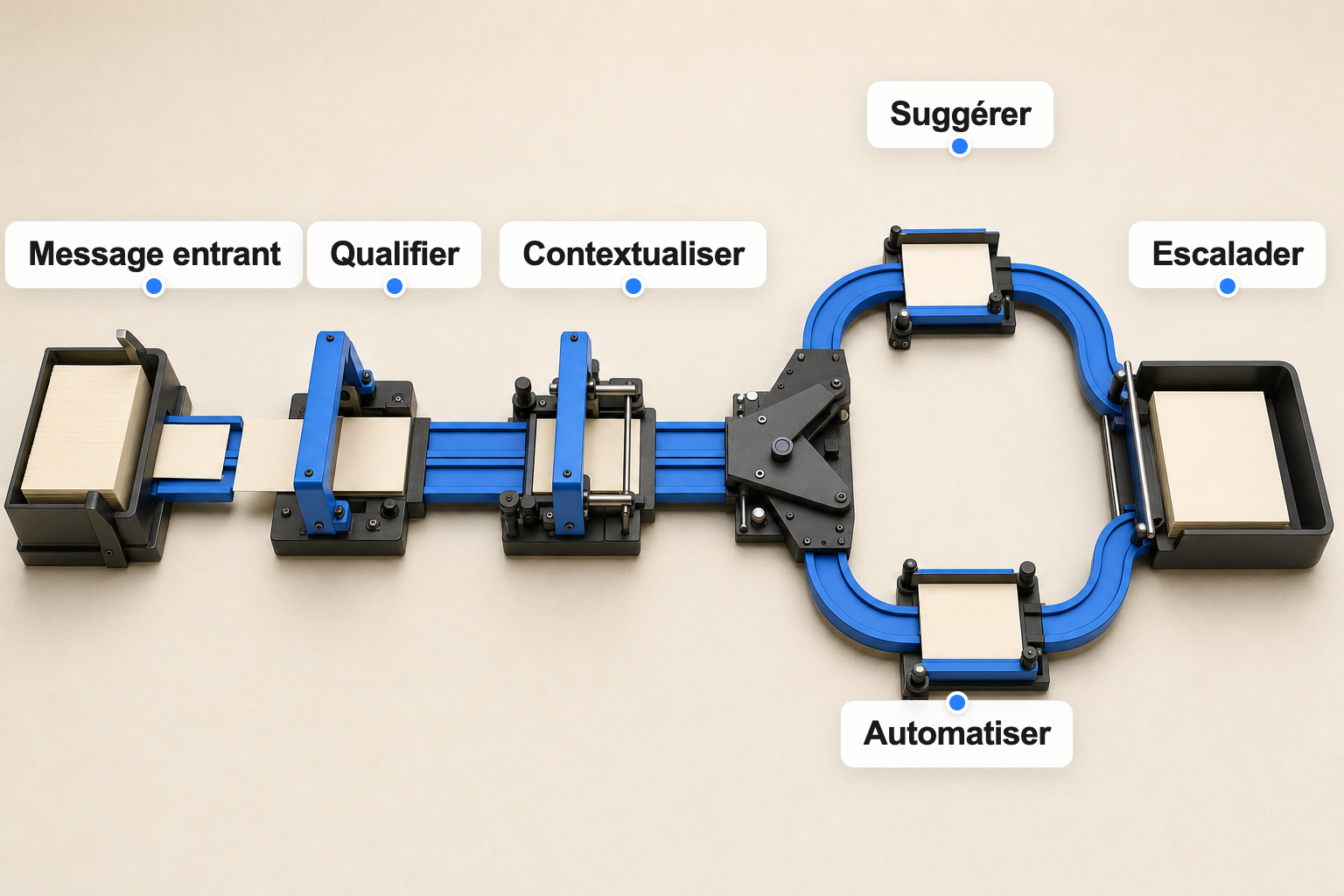
Escalation quickly reveals whether the chatbot is a support tool or just a chat interface.
In a real-world scenario, the bot doesn't just succeed when it avoids creating a ticket. It also succeeds when it forwards a cleaner ticket to the human agent.
Here's a simple example: If the bot opens a ticket in the CRM with a generic subject line, the agent has to read through the entire conversation to understand it. If the subject line accurately summarizes the issue, the category, and the context, the agent saves time before even starting to respond.
Another example: if a conversation in Italian ends with a final message in French, the experience feels disjointed. This isn't a matter of "tone." It's a matter of operational continuity.
Here's another example: if the bot uses an outdated source when more reliable information is available elsewhere, the customer receives a response that appears consistent on the surface but is actually incorrect.
That's why we need to evaluate an agent based on how they perform when pushed to their limits—not just on their moments of brilliance.
At Klark, we don't view the chatbot as an isolated chat bubble.
The issue is broader: how to get the co-pilot, automation, knowledge sources from support, CRM integrations, and quality safeguards to work together.
A useful agent must rely on the right information, propose a response, send it only if the scope and safeguards allow it, and then let a human take over when the situation requires it. This follows the same logic as in our article on AI co-pilots vs. agents: autonomy isn’t just a marketing gimmick—it’s a production responsibility.
And that sense of responsibility is evident in the details.
A good agent doesn't just write, "I'm forwarding your request." They forward it with the proper context. They don't just identify a category; they know whether that category allows for an automated response. They don't just retrieve information; they know which source takes precedence when two systems contradict each other.
The promise isn't to replace all support. The promise is to handle cases that can be handled better—and to better prepare for those that must remain in human hands.
If you're comparing solutions, don't limit your assessment to the quality of the conversation.
Instead, ask to see the edge cases.
What happens when a customer switches languages? When the account isn't authenticated? When an order has two conflicting statuses? When a ticket comes from a form that hides the customer's email address? When the bot must not respond automatically under any circumstances?
These questions aren't as appealing as a smooth demo. They're also much closer to reality.
A robust chatbot must be able to demonstrate its framework: what sources it uses, what actions it can trigger, what situations it cannot handle, how it escalates issues, how it connects to the CRM, and how the team can adjust its rules when conditions change.
That's the difference between "having a bot" and building a real AI system for customer service.
A useful chatbot is more than just software that talks to your customers.
It is a system that takes a request, determines the appropriate context, selects the appropriate level of autonomy, responds when it is safe to do so, and handles the situation properly when it is not.
The rest is often just window dressing.
If you want to evaluate a chatbot for your customer service, focus less on the conversational interface and more on the operations behind the scenes: categorization, data sources, scope, escalation, CRM, language, and controls.
That's where the real value lies.
A chatbot responds to a conversation. A useful conversational agent goes a step further: it understands intent, uses context, chooses the right level of autonomy, and knows how to escalate appropriately when a situation falls outside its scope.
We need to test edge cases: language changes, conflicting order data, tickets generated from a form, sensitive requests, CRM escalations, and situations where the automated response must be blocked.
Because a chatbot doesn't just succeed when it prevents a ticket from being created. It also succeeds when it forwards a ticket that is clearer, better contextualized, and easier for the human team to handle.