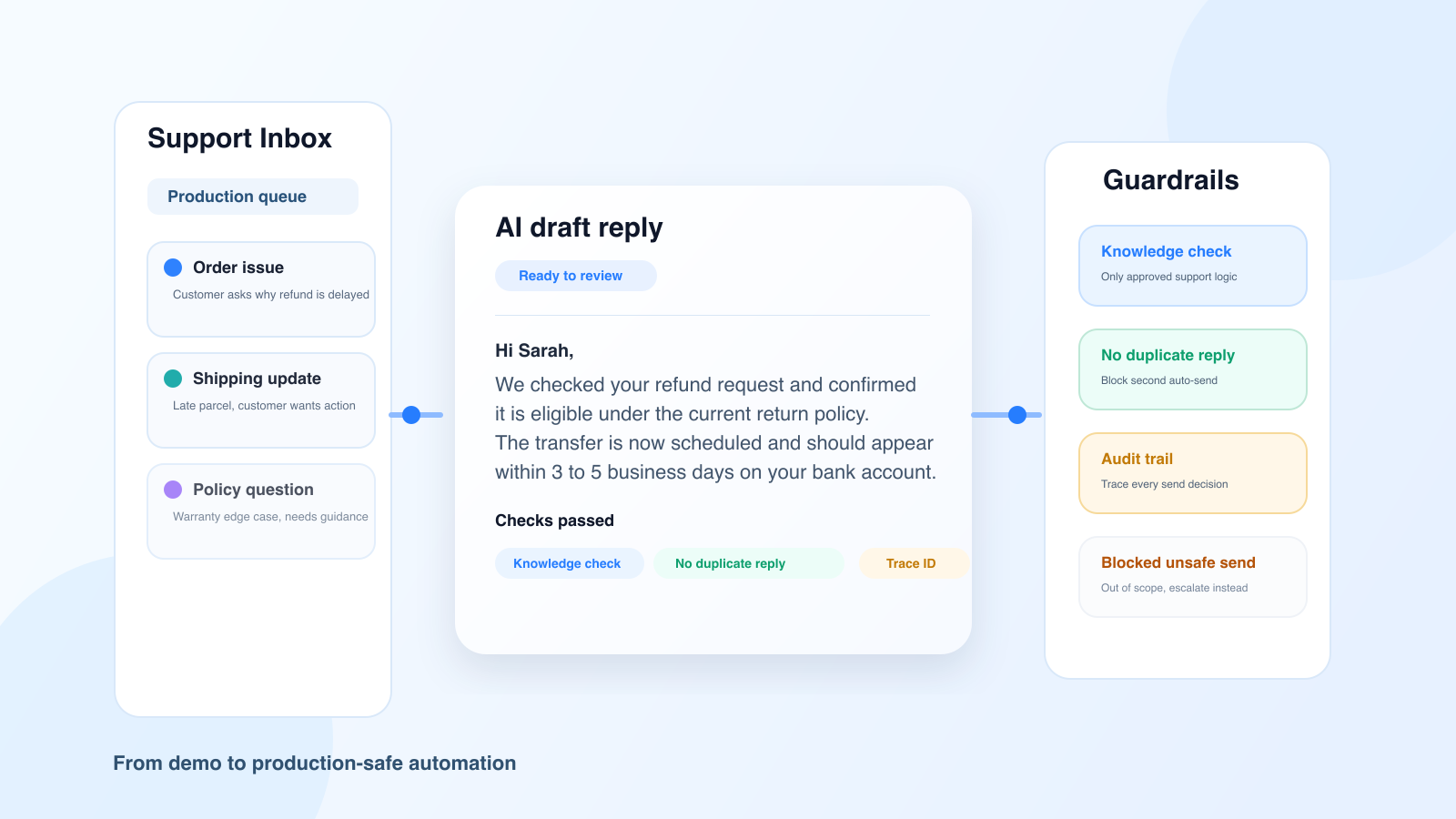
Many support teams find themselves in the same situation.
An AI demo generates a smooth, polished response in just a few seconds. Everyone then concludes that AI-powered customer support automation is ready to go.
Then comes production. And that’s when the real questions arise.
Does the response truly align with the customer’s knowledge base? Is there a risk that the AI could get stuck in an endless loop that the customer can’t untangle? Are there certain tickets that should be excluded from automated processing? How can we review what has been sent and determine what works and what doesn’t?
The difference between a convincing demo and reliable automation isn't just a matter of a longer prompt. It comes down to an overall architecture that includes, in particular, safeguards.
In a demo, the context is clean. The cases are carefully selected. The examples are well-structured. Errors rarely occur.
In production, it’s the opposite. Tickets come in with noise, exceptions, client-specific constraints, and situations where the right course of action isn’t to respond, but to escalate or refrain from acting.
In other words, a high-performing AI system isn’t judged solely on its ability to write a good sentence. It’s judged on its ability to know when not to automate.
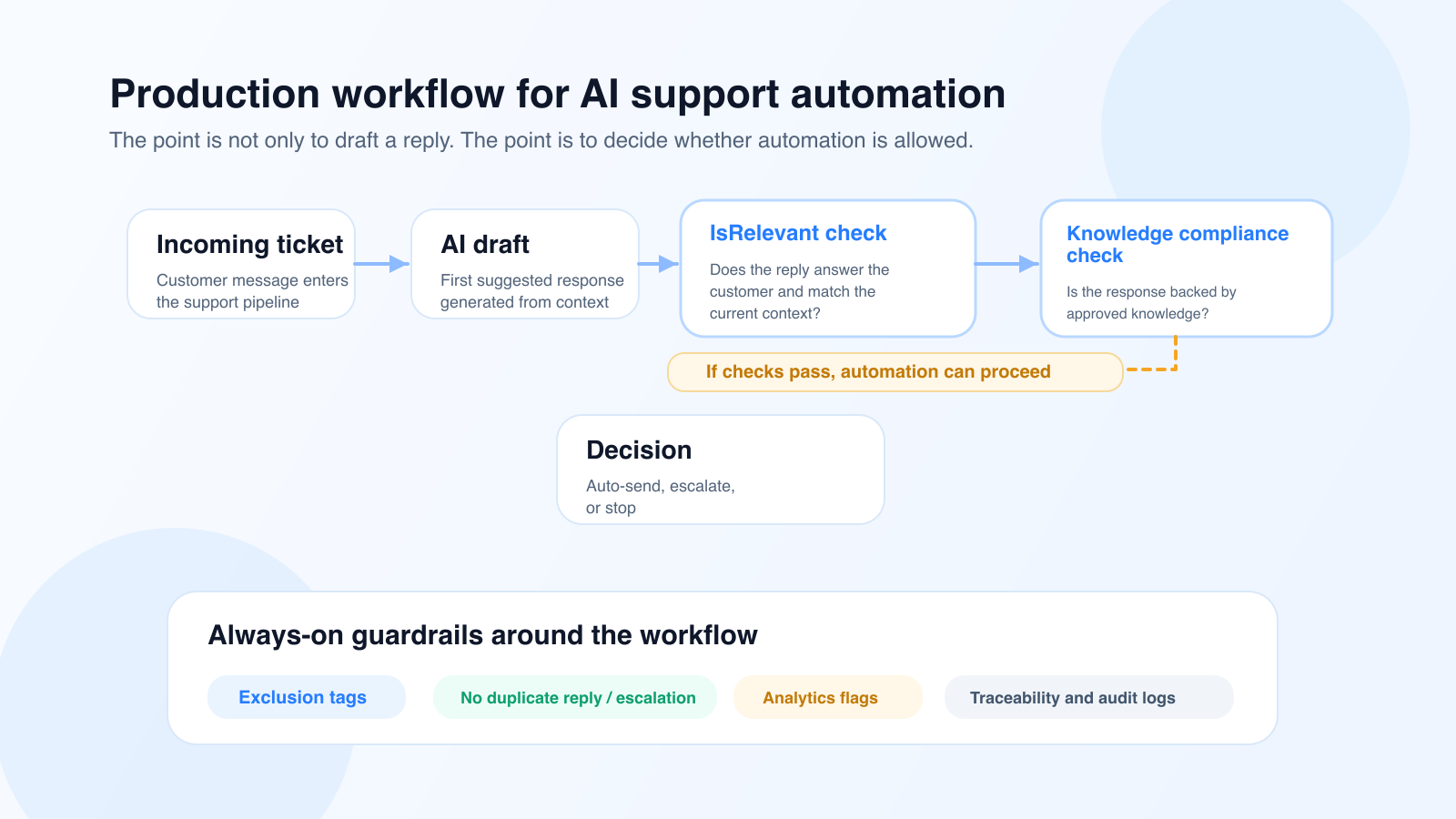
The first safeguard isn’t just about providing an answer that’s correct in an absolute sense. It’s about ensuring that the answer actually addresses the customer’s question and is relevant to the context at the exact moment the ticket is being handled.
At Klark, this role is handled by our checkpoint IsRelevant, which checks whether the suggestion actually addresses the customer’s intent, takes into account relevant information from the ticket, and remains consistent with the current situation. A response may be well-written, polite, or even plausible, yet completely off-topic (typically when the LLM “hallucinates”).
This point is crucial in production.
Before even considering whether an answer is consistent with the knowledge base, you must first ensure that it is relevant.
Garbage in, garbage out.
Once the relevance has been validated, the second risk is straightforward: a plausible response that is not supported by the knowledge base and falls outside the process.
At Klark, this issue is handled by a dedicated checkpoint, isCompliantWithKnowledge, whose role is to verify whether the response is directly supported by the client’s examples and procedures. A well-worded response is not enough; if the response cannot be found or reasonably inferred from the validated knowledge, it must not be sent.
This change is crucial for support teams. We no longer evaluate a suggestion solely on the basis of its writing quality, but also on its operational validity.
An automation system may seem to be working perfectly until the day it sends the exact same response to the same customer twice, triggering an endless loop in which the customer is held hostage by the machine.
This type of incident quickly undermines the customer experience and erodes agents’ confidence. That is why “anti-loop” rules must be part of the core framework; it is also a way to comply withthe AI Act by giving consumers the option to speak with a human.
Specifically, an AI-powered support system must be able to:
This isn't a finishing touch. It's an operational requirement.
If you don’t know which suggestions were sent automatically and how to track their execution in the logs, you don’t really have automation in production. You have a black box.
To effectively manage an AI support system, you need at least:
This observability layer is transforming the conversation with support and operations teams. We no longer talk about general impressions, but rather about volumes, filtered cases, tracked behaviors, and measurable improvements.
These "safeguards" are also what make automation truly plug-and-play at Klark.
Thanks to these checkpoints, it is no longer necessary to spend weeks in workshops manually defining the entire scope of automation, validating every edge case, or manually sorting through good and bad suggestions. The checkpoints automatically identify what can be automated, what must be excluded, and what must remain under human supervision.
This is what enables Klark to roll out automations at scale in less than a month, covering 30% of the traffic, without any client-side configuration.

Moving to AI-powered customer support automation doesn’t mean taking agents out of the loop. It means shifting their role.
Instead of reviewing each suggestion one by one, the team can set up:
AI then handles repetitive, well-defined tasks, while the team retains control over the scope, exceptions, and quality metrics. This combination of automation and assistance is also consistent with the broader applications of generative AI in customer service.
Most companies ask, “Does our AI provide good answers?”
The better question is: “Under what specific conditions do we allow her to answer on her own?”
This distinction is crucial. It transforms a flashy demo into a concrete, reliable system that delivers value.
Before opening the automation scope, make sure you have:
Without these building blocks, you can create a great demo. However, you cannot yet scale the platform or meet the standards expected of a high-performing customer service team.
AI-powered customer support automation doesn’t fail in production because the models produce poor-quality text. It fails when the company confuses text generation with a decision-making system.
The right approach is to manage AI systems using checkpoints, limited retries, explicit exclusions, and true observability. It is this transition from “it works in a demo” to “it holds up in production” that creates lasting value for support teams.
If you want to implement AI in your organization without losing control, the key is automation governance. And to see how this works in practice, you can also check out our Octopia case study.
In essence, this approach is also consistent with the NIST AI Risk Management Framework Playbook, which organizes risk management around functions such as governing, mapping, measuring, and managing.
About Klark
Klark is a generative AI platform that helps customer service agents respond faster and more accurately without changing their tools or workflows. Klark can be deployed in just a few minutes and is already used by more than 60 brands and 2,000 agents.